AppsCyborg
ANY PAINTING · YOUR PHOTO · NO WATERMARK
Style Cyborg icon

Your photo, painted by anyone.

Upload a photo and a painting you love. Style Cyborg borrows the painting’s colours, brushwork and texture and repaints your picture with them.

You pick the painting — not a menu of twelve filters everyone else has used

Style transfer image out
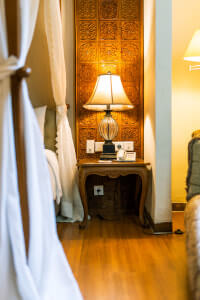
1 · Your photo A photograph of a hotel room with a lamp
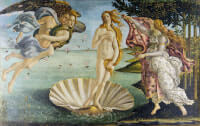
2 · The painting Botticelli’s The Birth of Venus, used as the style
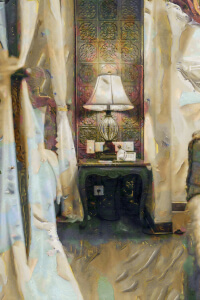
The room photograph repainted in Botticelli’s colours and brushwork that room, in that style
room-styled.jpg Ready

Two pictures in, one back. This is the whole app.

4.8 / 5 · 10,000+ paid
STYLE CYBORG is locked
Sign in or grab a day pass to start.
Locked

You're one step from your file.

Unlock STYLE CYBORG to run it. A €1 day pass is the quickest way in, about 30 seconds.

Day pass €1 for 24h
+ VAT, one-time

Unlimited use of every AppsCyborg tool for 24 hours, not just this one task. One click, no commitment.

Sign up to get the day pass

Quick signup, then one tap with Apple Pay or Google Pay.

No subscription 7-day refund 10,000+ paid

Yearly (€6) and lifetime (€30) plans also available (+ VAT). Sign up to see all options →

€1 day pass · €6 yearly · €30 lifetime · no ads, ever

Already have an account? Sign in

One account unlocks all 79 AppsCyborg tools Convert, compress, merge, download — image, PDF, video & more. See all tools →

Two pictures. That’s it.

1

Choose the pair

Your photo first, then the painting
The photo you want transformed, and any artwork whose look you want — a Van Gogh, a woodblock print, your own watercolour. Add them in that order; there is nothing to rename.
2

Download the result

The room photograph repainted in Botticelli’s colours and brushwork room-styled.jpg Same size as the photo you sent
An ordinary image file — print it, frame it, post it, use it as a cover. No watermark across the middle.

The painting you pick matters more than the photo. Artwork with strong, obvious texture — thick brushstrokes, bold colour, visible pattern — produces a striking result. A soft photorealistic painting has little style to lend, so the output looks like your photo with a colour cast. If the first attempt is underwhelming, change the painting rather than the picture. The result comes back at the same resolution as the photo you sent: measured, a 900 × 675 photo takes about 2 seconds and a 6000 × 4500 one about 95. Your download link stays live for 60 minutes.

Why not use a free AI art site?

Because “free” usually means a signature across the corner, a 512-pixel result, a queue, and terms giving the site a licence to your photos.

Any painting you like

You supply the artwork, so the look is yours — not one of twelve presets everyone recognises.

Full resolution back

No 512-pixel preview. A 6000-pixel photo comes back 6000 pixels wide, with no signature, logo or corner badge.

Your photos stay yours

Deleted with the 60-minute link. Not published to a gallery, not used to train anything.

Try it for €1

A 24-hour day pass costs €1 — enough to try a dozen paintings. No subscription, no auto-renewal.

Style Cyborg vs. the alternatives

Style Cyborg Free AI art sites Photo filter apps
Choice of style Any artworkA preset listA preset list
Resolution you get back The one you sentOften cappedPhone-sized
Watermark on the result NeverUsuallyFree tier only
Images per day UnlimitedA few creditsUnlimited
Anything to install NoNoAn app
Rights to your uploads YoursCheck the termsCheck the terms
Price from €1Free (data-funded)€5–10/mo

A filter app gives everyone the same twelve looks, which is why the results all start to look alike. Free AI sites hand you a small image with a signature on it and a few credits before the upgrade page. Style Cyborg lets you bring the painting — the difference between “an oil-paint filter” and “this particular canvas, applied to my photo” — paid for by the €1 that got you in, so nothing has to be paid for with your pictures.

See it in action

A short walkthrough: upload the photo, upload the painting, download the artwork.

Ready to try it? Create your account above.

What people make with it

An ordinary photo is the starting point, not the point.

2
images in, one out
styles — you bring them
60
minutes to download
0
ads & watermarks

Gifts & prints

A family photo in the style of a painting someone loves, framed on a wall.
Social & profile pictures

An avatar that isn’t another cropped selfie, and doesn’t look like everyone’s filter.

Covers & artwork

Album art, a book cover, a poster — a distinctive image without hiring an illustrator.

Teaching art

Show a class what impressionism, cubism or ukiyo-e actually does to a familiar scene.

Brand & mood boards

Push a set of stock photos through one artwork so they share a look.

Your own paintings

Photograph a canvas you made and apply your own style to everything else.

Whatever the pairing, two pictures in, one piece of art back.

Need something slightly different?

Want a painted look without supplying a painting? Painting Cyborg. After a drawn line instead of brushwork? Pencil Cyborg. Something bolder and flatter? Cartoon Cyborg — all included in one account.

Browse all 79 tools →

Common questions

Getting started

What is Style Cyborg?
A web app that repaints your photo in the style of an artwork you choose. Upload the photo and the painting, download the result — no watermark, no ads, nothing to install.
How do I tell it which picture is which?
By the order you add them: the first image is your photo, the second is the painting. Nothing to rename and nothing to configure. JPG, PNG, WebP and the other common formats all work for either slot, including whatever your phone shot — a screenshot or a photo of a painting in a book is a perfectly good style image.
Does it work on a phone?
Yes — pick both pictures from your camera roll on Android or on iOS 12 and higher. Nothing to install.

Quality & results

Which paintings work best?
Ones with obvious texture and strong colour: post-impressionists, expressionists, woodblock prints, mosaics, bold abstracts. A near-photographic painting has little visible style to borrow, so the result looks like your photo tinted a different colour.
Will faces still look like the person?
Roughly. Style transfer paints texture over everything, and heavy brushwork across small features can make a face look loose or smudged — the same thing happens in a real painting. Faces that fill more of the frame survive better than faces in a crowd.
Does it copy what’s in the painting?
No — it takes the how, not the what. Colours, brushstrokes and texture come across; the subject stays yours. A field of sunflowers won’t appear in your photo.
The result isn’t what I hoped. What now?
Change the painting first — it decides almost everything. Then try a simpler photo: uncluttered scenes with clear shapes take a style far better than busy ones. A day pass is unlimited, so trying five pairings costs the same as trying one.
Can I print it big?
Yes — the result comes back at exactly the resolution you uploaded, so a 6000 × 4500 photo returns 6000 × 4500. There is no preview-sized cap. Large photos just take longer: about 2 seconds at 900 × 675, about 95 seconds at 6000 × 4500.
When does the download link expire?
After 60 minutes. Save the image as soon as it’s ready — after that the link expires and you’d run the pair again.

Pricing, privacy & rights

How much does it cost?
Creating an account is free; you pay when you download. A €1 day pass gives you 24 hours of unlimited images — enough to try many pairings. Yearly (€6) and lifetime (€30) plans are also available (+ VAT), and every plan unlocks all 79 AppsCyborg tools — with a 7-day money-back guarantee.
What happens to my photos?
Both uploads are used to make your image and then deleted along with it when the 60-minute link expires. Nothing is kept, published to a gallery or used to train anything — no ads, no trackers. That’s the whole reason this is paid rather than ad-funded.
Can I sell what I make?
We claim nothing over your images. But two other people might have a say: whoever took the photo, and whoever holds rights to the painting. Artworks old enough to be in the public domain are the safe choice; a living artist’s work is not. Personal use and gifts are rarely an issue — check before selling prints.
Still have a question?
We usually reply within a day.
Contact support →

Pick a painting. See your photo in it.

Create your account and upload the pair — unlimited attempts for 24 hours, no watermark on any of them.

Free account €1 day pass Files deleted after 60 min
STYLE CYBORG is locked
Sign in or grab a day pass to start.
Locked

You're one step from your file.

Unlock STYLE CYBORG to run it. A €1 day pass is the quickest way in, about 30 seconds.

Day pass €1 for 24h
+ VAT, one-time

Unlimited use of every AppsCyborg tool for 24 hours, not just this one task. One click, no commitment.

Sign up to get the day pass

Quick signup, then one tap with Apple Pay or Google Pay.

No subscription 7-day refund 10,000+ paid

Yearly (€6) and lifetime (€30) plans also available (+ VAT). Sign up to see all options →

Already have an account? Sign in