
Trimming a screenshot
Cut a screenshot down to the one panel you're actually talking about before you send it.
Upload an image, drag a rectangle over the bit you want, download exactly that. The box shows the size of the file you'll get as you drag, and you can type an exact width and height if a slot demands one. Nothing re-scaled, no editor to open and no install — it works the same on a work laptop you can't put software on.
No watermark, no ads across the canvas, nothing kept afterwards
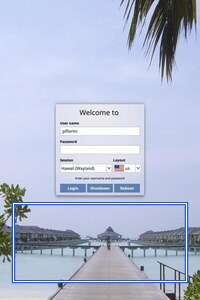 BEFORE
 CROPPED
Upload, drag, download. This is the whole app.
Unlock CROP IMAGE CYBORG to run it. A €1 day pass is the quickest way in, about 30 seconds.
Unlimited use of every AppsCyborg tool for 24 hours, not just this one task. One click, no commitment.
Sign up to get the day passQuick signup, then one tap with Apple Pay or Google Pay.
Yearly (€6) and lifetime (€30) plans also available (+ VAT). Sign up to see all options →
€1 day pass · €6 yearly · €30 lifetime · no ads, ever
Already have an account? Sign in
team-offsite-cropped.jpg
Same format · no watermark
Cropping throws pixels away for good The area outside the box isn't hidden, it's gone — so keep your original, because nothing can uncrop the copy later. It's one image per go, which is the right shape for a considered crop and the wrong shape for two hundred of them. If the crop leaves the file bigger than you need, Compress Image Cyborgfollows on neatly, and if the upload form wants a different format, Image to JPG Cyborg— both in the same account. Your download link stays live for 60 minutes.
It can, and if you're sitting at your own machine with a photo app open, use it. This is for the times that isn't the situation.
A locked-down work laptop, a borrowed machine, a Chromebook — a browser is all it needs.
The box reports the size of the file you'll download as you drag, and takes an exact width and height, so hitting a required banner or avatar dimension isn't guesswork.
Nothing kept, published or used to train anything. Files go when the 60-minute link expires.
A 24-hour day pass costs €1. No subscription, no auto-renewal — decide later.
| Crop Image Cyborg | Desktop photo app | Phone photo editor | Free online editor | |
|---|---|---|---|---|
| Works on a locked-down machine | Yes | If it's installed | Phone only | Yes |
| Exact pixel size while dragging | Shown, and typeable | Usually | Rarely | Sometimes |
| Opens WEBP and GIF | Both | Often not | Often not | Usually |
| Watermark on the result | Never | Never | Never | Sometimes |
| Ads & trackers | None | None | None | That's the business model |
| Many images at once | One at a time | With a batch action | One at a time | One at a time |
| Price | From €1 | Free / bundled | Free | Free, with ads |
Cropping is not a hard problem, and paying for it only makes sense in the specific spots the free options fall down: a machine you can't install on, a WEBP the built-in viewer refuses to open, an exact pixel size a listing or an ad slot demands, or a free web editor you'd rather not hand a customer photo to between two banner ads. If none of that is you, crop it where you are — and if any of it is, the €1 that got you in covers this and the other 78 tools too.
A short walkthrough: upload, drag the rectangle, download the area.
Ready to try it?
Usually to hit a required size, or to remove something that shouldn't be in the frame.
Cut a screenshot down to the one panel you're actually talking about before you send it.
A bystander, a street sign, a stray bin at the edge of an otherwise good photo.
A wide strip out of a tall photo, cut to the dimensions the template actually asks for.
Crop the square yourself instead of letting the upload form decide where your chin ends.
Tighten onto the item so the thumbnail shows the product, not the whole kitchen table.
A crop that fills the placeholder properly instead of being squashed to fit it.
Whatever it's for, upload the image and download the area you drew.
Need it smaller rather than tighter? Compress Image CyborgWrong format for the upload form? Image to JPG CyborgWant several photos side by side instead? Montage Cyborg— all included in one account.
Upload an image and drag a rectangle — exact pixels, no watermark, nothing kept.
Unlock CROP IMAGE CYBORG to run it. A €1 day pass is the quickest way in, about 30 seconds.
Unlimited use of every AppsCyborg tool for 24 hours, not just this one task. One click, no commitment.
Sign up to get the day passQuick signup, then one tap with Apple Pay or Google Pay.
Yearly (€6) and lifetime (€30) plans also available (+ VAT). Sign up to see all options →
Already have an account? Sign in