AppsCyborg
UP TO 50 PHOTOS · NO WATERMARK · PRINT-READY
Poster Cyborg icon

Your photo, as a stencil poster

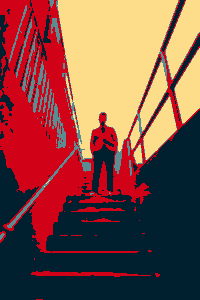
Drop a picture in and get it back in four flat colours with hard edges between them — the deep navy, red, slate blue and cream of a printed campaign poster. The same four every time, whatever colours you send.

Nothing stamped in the corner — a poster you can actually hang

Turn a photo into poster art Up to 50 photos
Drop a photo here or browse
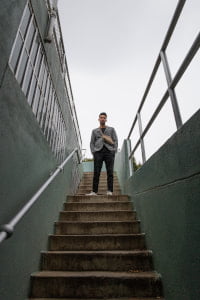
A photograph before it is rendered as a stencil poster BEFORE The same photograph rendered in four flat colours with hard edges POSTER
portrait-studio-poster.png · no watermark Ready

Drop a photo, download the poster. This is the whole app.

4.8 / 5 · Trusted by 10,000+ paid members · 4.8 / 5
POSTER CYBORG is locked
Sign in or grab a day pass to start.
Locked

You're one step from your file.

Unlock POSTER CYBORG to run it. A €1 day pass is the quickest way in, about 30 seconds.

Day pass €1 for 24h
+ VAT, one-time

Unlimited use of every AppsCyborg tool for 24 hours, not just this one task. One click, no commitment.

Sign up to get the day pass

Quick signup, then one tap with Apple Pay or Google Pay.

No subscription 7-day refund 10,000+ paid

Yearly (€6) and lifetime (€30) plans also available (+ VAT). Sign up to see all options →

€1 day pass · €6 yearly · €30 lifetime · no ads, ever

Already have an account? Sign in

One account unlocks all 79 AppsCyborg tools Convert, compress, merge, download — image, PDF, video and more. See all tools →

Two steps. That's it.

1

Drop the photo in

JPG · PNG · WEBP · up to 50 files
Nothing to set. Strong shapes and clear light give the best result — the effect works with contrast, not detail.
2

Download the poster

portrait-studio-poster.png Full size · no watermark
A PNG at the size you sent — send it to a print shop, frame it, or set your own type over it.

What actually changes Everything becomes one of four flat colours: deep navy, red, slate blue and cream. That is a fixed scheme, not a reduction of your photo's own colours — send a green landscape or a black-and-white portrait and both come back in the same four. Fine texture goes with it: hair becomes a shape, a knitted jumper becomes a block. It rewards real light and shadow and punishes flat, evenly-lit photos. Want drawn lines instead? Cartoon CyborgWant brushwork and texture? Painting Cyborg— both in the same account. Your download link stays live for 60 minutes.

Why not do it in Photoshop?

If you have it open and you know the adjustment, do — though you would be building this palette by hand. This is for the other case: you want the poster now, on whatever machine you're at.

Full size, clean

Same pixels out as in, so it's big enough to print — and nothing written across the corner.

No account to cancel

A €1 day pass is a one-off payment. Nothing renews, nothing bills you next month.

Nothing kept

No gallery, no feed, no camera-roll permission. Files go when the 60-minute link expires.

PNG, so the colours stay flat

Four flat colours saved as JPEG turn into thousands, with ringing on every edge. You get a PNG — 4 colours and a smaller file, not 18,000 and a bigger one.

Poster Cyborg vs. the alternatives

Poster Cyborg Free effect sites An image editor
Watermark NoneUsuallyNone
Output size Same as your originalOften shrunkAny
Skill needed Upload a fileUpload a fileBuild the palette yourself
Works on any machine Any browserAny browserWhere it's installed
Ads & trackers NoneNoneNone
Photos uploaded to a gallery NeverOften public by defaultStays local
Price From €1Free, with ads€25–60/month

An image editor wins on control, and if you already own one you can build this look yourself — though matching four specific colours by hand is more work than it sounds. Most people don't own one, and a subscription for a single effect is absurd. The free effect sites shrink the result, wrap it in advertising and stamp their name across it, which is useless if you meant to print the thing. This returns the full-size file, clean.

See it in action

A short walkthrough: drop a photo, see the flat-colour poster, download it.

Ready to try it?

What people make with it

Flat colour reads from across a room, where a photograph just looks small.

1:1
same size out as in
50
photos per run
60
minutes to download
€1
for a whole day of it

Wall prints

A photo of the dog or the city becomes artwork you can hang without it looking like a holiday snap.
Gig & event posters

Flatten the band photo first, then set your type over it — text sits far better on flat colour than on a busy photograph.

Stickers & shirts

Four flat colours is exactly what screen printers and vinyl cutters want — photographs are the hard case.

Avatars & profiles

A poster portrait still reads at thumbnail size, and looks deliberate rather than like a cropped selfie.

Slides & backgrounds

A flattened image behind a title stays quiet enough to read over — the detail that fought the text is gone.

Puzzles & games

Big flat colour areas make a fiendish jigsaw — send it on to Puzzle Cyborg if you mean to be cruel.

Whatever it's for, drop the photo and download the poster.

Need something slightly different?

Want drawn lines instead of flat colour? Cartoon CyborgWant brushwork and texture? Painting CyborgWant the style of a particular artwork? Style Cyborg— all included in one account.

Browse all 79 tools

Common questions

Getting started

What does Poster Cyborg do?
It renders your photograph as a stencil poster: every shade in the picture becomes one of four flat colours, with hard edges between the shapes. Drop a picture in and download the result at the size you sent, no watermark.
What colours will my poster be?
Always the same four: a deep navy, a red, a slate blue and a pale cream — the flat scheme of a printed campaign poster. This is the part people are usually surprised by, so it is worth being plain about it. The colours are not taken from your photograph and reduced; they are fixed, and your picture is mapped onto them by how light or dark each part of it is.
Which formats can I upload, and what comes back?
JPG, PNG and WEBP go in. A PNG always comes back, whatever you sent — four flat colours saved as JPEG stop being four flat colours, picking up ringing on every edge and getting larger in the process. Anything else — HEIC from an iPhone, RAW from a camera — goes through Image to JPG Cyborg first, which is in the same account.
Does it work on a phone?
Yes — pick the photo from your camera roll on Android or on iOS 12 and higher. Nothing to install, and no permission to your whole library.

The look & printing it

Which photos work best?
Strong light, clear shapes, a subject that stands out from its background — a portrait against a plain wall, a building against the sky. Flat, evenly-lit photos and busy backgrounds fare worst, because the effect works with contrast rather than detail.
Will faces still look right?
Recognisable, but graphic — a face becomes areas of red, slate blue and cream, and freckles, stubble and fine wrinkles disappear entirely. It is a poster of the person, not a portrait of them. For something gentler on faces, Cartoon Cyborgor Painting Cyborgare kinder.
Can I choose how many colours, or which ones?
No — there is one setting and it produces exactly four. That is what makes a whole set come back matching, and it is why the result looks like a printed poster rather than a broken JPEG. If you need to pick the palette yourself, that is a job for an image editor.
What if my photo is already black and white?
It comes back in colour — the same navy, red, slate blue and cream as everything else. The effect works from lightness alone, so a greyscale photograph is a perfectly good input; it just will not stay greyscale.
Does it add text or a border?
No — it changes the picture itself, it does not lay out a poster for you. You get a clean image with no type, no frame and no margin, which is what you want if you are adding your own title on top afterwards.
Can I print it big?
You get the same pixel size you sent, so send the biggest original you have. Flat colour is forgiving at large sizes — there is no fine texture to go soft, so a poster print holds up better than the photograph would.
Can I do a whole set at once?
Yes — up to 50 photographs in one go, and they come back together as a ZIP. Larger photos take a little while: about a minute for a typical 12-megapixel phone photo, longer for anything from a full-frame camera.
When does the download link expire?
After 60 minutes. Save the image as soon as it's ready — after that the link expires and you'd upload the photo again.

Pricing, privacy & rights

How much does it cost?
A €1 day pass gives you 24 hours of unlimited posters. Yearly is €6 and lifetime is €30. All three are one-off payments — nothing renews and nothing bills you next month — and every plan unlocks all 79 AppsCyborg tools.
What happens to my photo?
It's used to make your poster and then deleted along with it when the 60-minute link expires. Nothing is kept, published, shown in a public gallery or used to train anything — no ads, no trackers.
Can I sell the result?
If the photo is yours, the poster is yours — print it, hang it, sell it, no attribution needed. If someone else took the photo, rendering it as poster art doesn't transfer their rights, and a recognisable person still has a say in commercial use.
Still have a question?
We usually reply within a day.
Contact support

A poster of it, in under a minute.

Drop your photo in and download the poster — full size, no watermark, nothing kept.

Up to 50 photos From €1, no subscription Files deleted after 60 min
POSTER CYBORG is locked
Sign in or grab a day pass to start.
Locked

You're one step from your file.

Unlock POSTER CYBORG to run it. A €1 day pass is the quickest way in, about 30 seconds.

Day pass €1 for 24h
+ VAT, one-time

Unlimited use of every AppsCyborg tool for 24 hours, not just this one task. One click, no commitment.

Sign up to get the day pass

Quick signup, then one tap with Apple Pay or Google Pay.

No subscription 7-day refund 10,000+ paid

Yearly (€6) and lifetime (€30) plans also available (+ VAT). Sign up to see all options →

Already have an account? Sign in