AppsCyborg
FACES FOUND AUTOMATICALLY · NO WATERMARK
Face Blur Cyborg icon

Publish the photo, not the faces

Upload a picture and the faces in it come back blurred — found for you, so you're not drawing black boxes over eleven heads at half past six and hoping you got them all. It looks twice, once at the photo's own size and once at double, so the small ones at the back are caught too.

The blur is baked in permanently — nothing to reverse, nothing kept here

Blur the faces in a photo automatic
Drop a photo here or browse
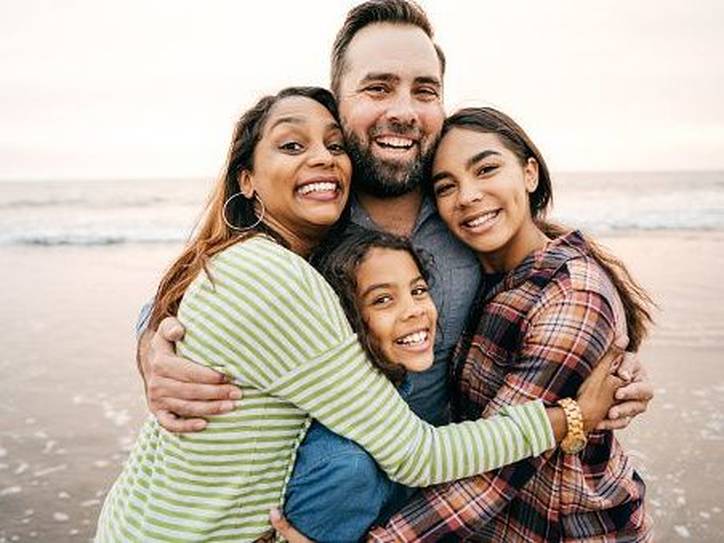
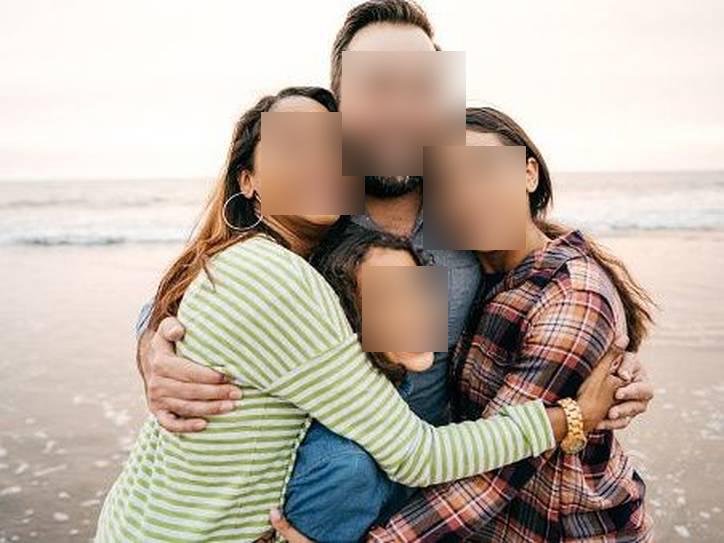
A photograph of four people with their faces visible BEFORE The same photograph with every face blurred out and the rest unchanged BLURRED
street-festival-blurred.jpg · same size · no watermark Ready

Upload, wait a moment, download. This is the whole app.

4.8 / 5 · Trusted by 10,000+ paid members · 4.8 / 5
FACE BLUR CYBORG is locked
Sign in or grab a day pass to start.
Locked

You're one step from your file.

Unlock FACE BLUR CYBORG to run it. A €1 day pass is the quickest way in, about 30 seconds.

Day pass €1 for 24h
+ VAT, one-time

Unlimited use of every AppsCyborg tool for 24 hours, not just this one task. One click, no commitment.

Sign up to get the day pass

Quick signup, then one tap with Apple Pay or Google Pay.

No subscription 7-day refund 10,000+ paid

Yearly (€6) and lifetime (€30) plans also available (+ VAT). Sign up to see all options →

€1 day pass · €6 yearly · €30 lifetime · no ads, ever

Already have an account? Sign in

One account unlocks all 79 AppsCyborg tools Convert, compress, merge, download — image, PDF, video and more. See all tools →

Two steps, then one look.

1

Upload the photo

JPG · PNG · WEBP · GIF · up to 50 files
Nothing to mark up. You don't tell it where the faces are — that's the part it's for.
2

Check it, then publish

street-festival-blurred.jpg Same size · no watermark
Give the result ten seconds of your own eyes before it goes out. Detection is good, not infallible.

Read this bit if the photo is going public Faces looking roughly at the camera are found very reliably, and because it also checks an enlarged copy, small ones in a crowd usually are too. What can still be missed is the hard stuff: a head turned away, half behind someone else, deep in shadow, or a handful of pixels wide at the very back. So this saves you the work, not the responsibility — look at the result before you publish. And a blurred face isn't total anonymity: clothing, a tattoo, a name badge, a car plate or the location can still identify someone. If it's the surroundings that give it away, Crop Image Cyborg will take them out of frame, and if a mask suits better than a blur, Facemask Cyborg — both in the same account. Your download link stays live for 60 minutes.

Why not just draw boxes over them?

For two faces, do exactly that. For a photo of a crowd it's twenty minutes of careful clicking, and the one you miss is the one that matters.

Every face at once

Three people or thirty, it's the same single upload and the same wait — and it looks twice, so the small faces at the back are found as well.

The rest is untouched

Same crop, same resolution, same colour — only the face areas change, and you get the same file format back.

Nothing recognised is stored

No face database, no identities, no profiles. The photo goes when the 60-minute link expires.

Try it for €1

A 24-hour day pass costs €1. No subscription, no auto-renewal — decide later.

Face Blur Cyborg vs. the alternatives

Face Blur Cyborg Blurring by hand Emoji or sticker over faces Cropping them out
A crowd of twenty faces One upload 20 minutes, error-prone 20 stickers to place Not possible
Finds the faces for you Yes, twice over You do You do You do
Keeps the photo usable Yes Yes Looks like a meme Loses the scene
Reversible by the recipient No — baked in No, if flattened No, if flattened No
Software to install None An editor A phone app Any photo app
Catches every single face Nearly always — check it If you're thorough If you're thorough Yes, by removal
Price From €1 Your time Free Free

One or two faces in a photo you're sending to a colleague: mark it up wherever you are and move on. The case for this is the school sports day, the conference floor, the protest, the shop interior with customers in it — photos with more faces than you want to click on, that are going somewhere public, where missing one is a real problem rather than an untidy one. It does the finding; you do the final look. Covered by the same €1 that got you in.

See it in action

A short walkthrough: a crowd photo in, every face blurred out.

Ready to try it?

When faces have to go

Usually because the photo is going somewhere public and the people in it never agreed to that.

50
upload, every face
0
identities stored
60
minutes to download
€1
for a whole day of it

Incident & site reports

Evidence photos that need to circulate internally without naming the people standing in them.

Property & retail listings

A shop or venue photographed while open, with customers and staff who weren't asked.

Events & conferences

A busy room shot that shows the turnout without putting every attendee on your website.

Schools & youth clubs

A sports day photo for the newsletter where only some parents returned the consent form.

Journalism & reporting

Protests, clinics, courtrooms — publishing the situation without exposing the individuals in it.

Family photos, posted

Sharing the holiday picture while keeping other people's children out of your feed.

Whatever it's for, upload the photo and check the blurred version.

Need something slightly different?

Easier to cut them out of frame? Crop Image Cyborg Want a mask on a face instead? Facemask Cyborg Photo too heavy for the site afterwards? Compress Image Cyborg — all included in one account.

Browse all 79 tools

Common questions

Files & getting started

Will it definitely find every face?
Faces turned towards the camera and reasonably sized: very reliably. Detection runs twice — once at the photo's own size and once on a doubled copy — which is what catches the smaller faces further back; on a test photograph shrunk until the faces were about 55 pixels wide, one pass found one of four and two passes found all four. What still gets missed is the hard stuff: a profile, a head half behind someone else, deep shadow, heavy motion blur, or a face barely thirty pixels wide at the back of a crowd. Look at the result before you publish.
Does the rest of the photo change?
No. Same crop, same resolution, same colours — only the detected face areas are replaced. Your original file isn't touched at all.
Which formats can I upload?
JPG, PNG, WEBP and GIF, at the same dimensions you sent. JPG, PNG and GIF come back in the format they arrived in; a WEBP comes back as a JPG, because the library that reads WEBP here cannot write it. For RAW or anything unusual, Image to JPG Cyborg converts first.
Can it do video?
No — still images only. Blurring faces reliably through every frame of a video is a different and much harder job.

Detection & accuracy

Can I keep one person unblurred?
No — it blurs every face it finds, with no picking and choosing. For a portrait of one person in front of a crowd, an editor is the right tool.
Can the blur be reversed?
No. The pixels are replaced in the file you download — there's no hidden layer underneath and nothing for anyone to peel off. Measured on a detected face, the fine detail that carries a recognisable feature drops by about 88%, which is why there is nothing left to recover. That's the whole point, and it's why you should keep your original if you ever need the unblurred version. If the giveaway is elsewhere in the frame, Crop Image Cyborg removes it, and Facemask Cyborg puts a mask on instead if that suits the picture better.
Is a blurred face really anonymous?
The face is unreadable, but a person can still be recognisable from a uniform, a tattoo, a name badge, a pushchair, a car plate or simply the place and time. If the stakes are high, treat the blur as one step and check the rest of the frame too.
Does it work on animals, posters or statues?
It looks for human faces, so a face on a billboard or a portrait hanging on the wall behind your subject may well get blurred too. Usually harmless, occasionally surprising — another reason for the quick look.
Can I publish the blurred photo?
As far as we're concerned, yes — it's your photo, there's no watermark and no attribution is required. Whether publishing it is the right call is a judgement about the picture and the people in it, not one this tool can make for you.
How long does it take?
A few seconds a photo. Looking twice costs a little more than looking once — measured on a 4032-pixel photograph, about four seconds against one and a half — which is a fair trade for the faces the second pass catches. A batch of fifty is a couple of minutes.
Can I do a whole set at once?
Yes — up to 50 photographs in one go, and they come back together as a ZIP. Each one is checked on its own, so a photo with nobody in it simply comes back unchanged rather than failing.
When does the download link expire?
After 60 minutes. Save the photo as soon as it's ready — after that the link expires and you'd upload again.

Pricing & privacy

Do you store the faces or identify anyone?
No. Detection finds where the faces are so it can blur them — it doesn't work out who they are, and nothing about them is stored. No face database, no matching, no profiles. The photo and the result are deleted when the 60-minute link expires.
Does this make me GDPR compliant?
It's a tool, not legal advice. Blurring faces is a common and sensible step towards publishing photos of people responsibly, but whether a given photo is lawful to publish depends on your context, and that judgement stays with you.
How much does it cost?
A €1 day pass gives you 24 hours of unlimited photos. Yearly is €6 and lifetime is €30. All three are one-off payments — nothing renews and nothing bills you next month — and every plan unlocks all 79 AppsCyborg tools.
Still have a question?
We usually reply within a day.
Contact support

Every face blurred, in about 30 seconds.

Upload a photo — same size back, no watermark, nothing kept.

Up to 50 photos From €1, no subscription Files deleted after 60 min
FACE BLUR CYBORG is locked
Sign in or grab a day pass to start.
Locked

You're one step from your file.

Unlock FACE BLUR CYBORG to run it. A €1 day pass is the quickest way in, about 30 seconds.

Day pass €1 for 24h
+ VAT, one-time

Unlimited use of every AppsCyborg tool for 24 hours, not just this one task. One click, no commitment.

Sign up to get the day pass

Quick signup, then one tap with Apple Pay or Google Pay.

No subscription 7-day refund 10,000+ paid

Yearly (€6) and lifetime (€30) plans also available (+ VAT). Sign up to see all options →

Already have an account? Sign in