AppsCyborg
UP TO 50 PHOTOS · NO WATERMARK · PRINT-READY
Pencil Cyborg icon

Your photo, drawn in pencil.

Drop a picture in and get graphite back — line where the edges are, shading where the light falls, white paper everywhere else. The kind of sketch that looks drawn by hand, not filtered.

Nothing stamped in the corner — a sketch you can actually frame

Turn a photo into a pencil drawing image out
Drop a photo here or browse
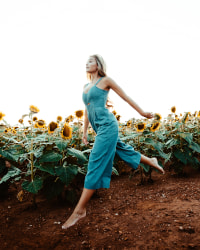
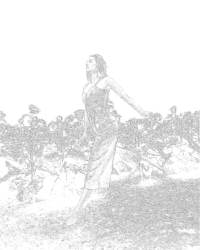
A photograph of a woman in a sunflower field, before sketching before The same sunflower-field photograph after Pencil Cyborg, drawn in graphite on white sketched
Same size · no watermark Ready

Drop photos, get drawings. This is the whole app.

4.8 / 5 · 10,000+ paid
PENCIL CYBORG is locked
Sign in or grab a day pass to start.
Locked

You're one step from your file.

Unlock PENCIL CYBORG to run it. A €1 day pass is the quickest way in, about 30 seconds.

Day pass €1 for 24h
+ VAT, one-time

Unlimited use of every AppsCyborg tool for 24 hours, not just this one task. One click, no commitment.

Sign up to get the day pass

Quick signup, then one tap with Apple Pay or Google Pay.

No subscription 7-day refund 10,000+ paid

Yearly (€6) and lifetime (€30) plans also available (+ VAT). Sign up to see all options →

€1 day pass · €6 yearly · €30 lifetime · no ads, ever

Already have an account? Sign in

One account unlocks all 79 AppsCyborg tools Convert, compress, merge, download — image, PDF, video & more. See all tools →

Two steps. That’s it.

1

Drop your photos in

JPG, PNG or WEBP
One photo or fifty — drag them in or browse for them. Nothing to configure: no sliders, no filter grid to scroll through.
2

Download the sketch

The same sunflower-field photograph after Pencil Cyborg, drawn in graphite on white grandad-portrait-pencil.png Full size · no watermark
An ordinary image file at the size you sent it — post it, print it, or send it to a framer. Send two or more and they come back in one ZIP.

What makes a good one. Graphite is edges and tone, so contrast matters more than colour: a well-lit subject against a plain background draws beautifully, while a dim photo or a busy backdrop turns into grey scribble. Faces, pets, cars and buildings are the safe bets. Because the result is grey on paper white, anything that only stood out by colour — a red coat against green leaves — can flatten out. Want colour and brushwork instead? That’s Painting Cyborg. Your download link stays live for 60 minutes.

Why not a free sketch app?

Because the free export is small, has a logo across the corner, and the full-size version is behind a subscription you’ll forget to cancel.

Full size, clean

You get the drawing at the size you sent it, with nothing written across the corner.

No account to cancel

A €1 day pass is a one-off payment. Nothing renews, nothing bills you next month.

Your photos stay yours

No gallery, no feed, no camera-roll permission. Files go when the 60-minute link expires.

Fifty at a time

A drawing takes a second or two, so a whole set of them is done before the kettle boils.

Pencil Cyborg vs. the alternatives

Pencil Cyborg Free sketch apps Commission an artist
Watermark NoneUsuallyNone
Size you can download FullReduced until you payFull
Photos at once Up to 50OneOne commission
Trying it again As often as you likeA few runs, then payExtra cost
Time for one photo A second or twoA minuteDays to weeks
Photos uploaded to a gallery NeverOftenShared with the artist
Ads & trackers NoneAd-fundedNone
Price from €1€5–10 / month€80–300

A real pencil portrait from a real artist is a lovely thing and costs what a lovely thing costs. Free sketch apps are free until you want the file: then it’s a small export with a logo on it, or a monthly plan for one drawing you wanted once. Pencil Cyborg is a drop box and a Download button, paid for by the €1 that got you in — so nothing has to be paid for with your photos.

See it in action

A short walkthrough: drop a portrait, download the sketch, send it to print.

Ready to try it? Create your account above.

What people draw with it

Graphite quietly turns a snapshot into something that reads as a keepsake.

50
photos at a time
0
watermarks & ads
60
minutes to download
€1
for a whole day of it

Portrait gifts

A pencil portrait of a parent or a grandchild, printed and framed — from a photo on your phone.
Memorials & tributes

Graphite carries an old or imperfect photo more gently than a colour blow-up does.

Tattoo & art reference

Line and tone stripped out of a photo, which is what an artist actually wants to work from.

Colouring pages

Print the sketch of a pet or a house and hand it to a child with a box of pencils.

Invitations & stationery

A sketched venue or house on the front of a card — grey on white prints cheaply and looks expensive.

Busy backgrounds, hidden

A cluttered kitchen or a harsh flash matters far less once everything is line and shading.

Whatever it’s for, drop the photos and download the drawings.

Need something slightly different?

Want colour and brushwork instead of graphite? Painting Cyborg. Just want it in grey without the drawing? BW Cyborg. After something more playful? Cartoon Cyborg — all included in one account.

Browse all 79 tools →

Common questions

Getting started

What is Pencil Cyborg?
A web app that redraws your photograph as a pencil sketch — graphite line, shading, paper white. Drop a picture in, download the drawing at the size you sent it, with no watermark and no ads.
How is this different from black & white?
A black-and-white conversion is still a photograph, just without colour — that’s BW Cyborg. This finds the edges and redraws them as strokes on paper, so most of the frame ends up white rather than grey. On a typical photo about 70% of the finished drawing is paper.
Does it work on a phone?
Yes — pick the photo from your camera roll on Android or on iOS 12 and higher. Nothing to install, and no permission to your whole library. Shots taken in portrait come back the right way up: the orientation your phone recorded is read and baked in before the drawing is made.
What can I send, and what do I get back?
JPG, PNG and WEBP all work, and so do GIF, BMP and TIFF. The drawing comes back as a PNG. That is not arbitrary: a sketch is mostly flat paper white with thin dark strokes, which PNG stores exactly and compresses far better than JPEG — a dense 8.8-megapixel drawing is 592 KB as PNG against 1,072 KB as a top-quality JPEG, with no compression softening around the strokes.

Quality & results

Which photos work best?
Strong contrast and a plain background. A face lit from the side, a pet against a wall, a building against sky. Dim indoor shots and busy backgrounds are the two things that turn a sketch into grey mush.
Does the size of the photo matter?
A great deal, and in one direction. The pencil stroke is a fixed size in pixels, so on a small picture the strokes pile up and the drawing fills in: the same photo comes back 54% paper at 200 pixels wide and 87% paper at 1,600. Small images turn to scribble, large ones stay open and clean. Send the file straight off the camera or phone, not a copy that has been through a chat app.
My sketch came out too dark or too faint.
That follows the original: a noisy or low-light photo gives dense shading, a flat over-exposed one gives thin lines. Brightening and adding a little contrast to the photo before you upload it fixes most cases — and running it again costs nothing on top of the pass you already have.
Is it colour pencil or graphite?
Graphite — grey on paper white. If two things in your photo differed only in colour and not in brightness, expect them to sit at a similar tone in the drawing.
Can I print it large?
You get the same pixel size you sent, so send the biggest original you have — straight off the camera or phone, not a copy that’s been through a chat app. Pencil strokes hold up well on matte paper; on glossy, the white can look bright next to the graphite.
Can I adjust the stroke or the darkness?
There are no sliders here — one drop, one drawing, which is the point. The lever you do have is the photo itself: crop tighter, brighten it, or pick a shot with cleaner light. Running the same photo again also gives a slightly different drawing — the strokes are placed afresh each time, the way a person sketching it twice would.
How many photos can I send at once?
Up to 50, at up to 100 MB each. Drawing is quick — about a second and a half for a 12-megapixel photo, so a full batch of fifty is roughly three minutes of work. Nearly all of the wait you notice is the upload. Send two or more and they come back together in one ZIP.
When does the download link expire?
After 60 minutes. Save the file as soon as it’s ready — after that the link expires and you would have to upload the photos again.

Pricing, privacy & rights

How much does it cost?
Creating an account is free; you pay when you download. A €1 day pass gives you 24 hours of unlimited drawings. Yearly (€6) and lifetime (€30) plans are also available (+ VAT), and every plan unlocks all 79 AppsCyborg tools — with a 7-day money-back guarantee.
What happens to my photos?
They are used to make your drawings and then deleted along with them when the 60-minute link expires. Nothing is kept, published, shown in a gallery or used to train anything, and there are no ads and no third-party trackers. That matters more with family photos than with most files.
Can I sell the result?
If the photo is yours, the drawing is yours — print it, gift it, sell it, no attribution needed. If someone else took the photo, sketching over it doesn’t transfer their rights, and a recognisable person still has a say in commercial use.
Still have a question?
We usually reply within a day.
Contact support →

A pencil drawing of it, in about 30 seconds.

Create your account and drop your photos — full size, no watermark, nothing kept.

Free account €1 day pass Files deleted after 60 min
PENCIL CYBORG is locked
Sign in or grab a day pass to start.
Locked

You're one step from your file.

Unlock PENCIL CYBORG to run it. A €1 day pass is the quickest way in, about 30 seconds.

Day pass €1 for 24h
+ VAT, one-time

Unlimited use of every AppsCyborg tool for 24 hours, not just this one task. One click, no commitment.

Sign up to get the day pass

Quick signup, then one tap with Apple Pay or Google Pay.

No subscription 7-day refund 10,000+ paid

Yearly (€6) and lifetime (€30) plans also available (+ VAT). Sign up to see all options →

Already have an account? Sign in