AppsCyborg
FACE FOUND AUTOMATICALLY · MASK FITTED · NO WATERMARK
Facemask Cyborg icon

A mask on the photo, not on your afternoon

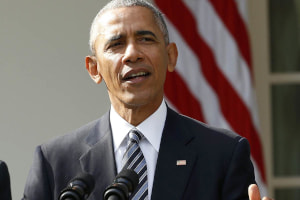
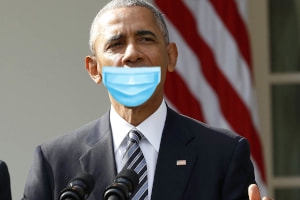
Upload a portrait and a medical mask is fitted over the nose and mouth for you — positioned, angled and sized to the face it found. Useful when a picture has to show a mask and nobody is going to be photographed again.

No watermark, no app, no photo-network account

Put a mask on a portrait automatic fit
Drop a photo here or browse
A photograph of four people with their faces uncovered BEFORE The same photograph with a medical mask fitted to each face MASKED
staff-portrait-masked.jpg · same size Ready

Upload, wait a moment, download. This is the whole app.

4.8 / 5 · Trusted by 10,000+ paid members · 4.8 / 5
FACE MASK CYBORG is locked
Sign in or grab a day pass to start.
Locked

You're one step from your file.

Unlock FACE MASK CYBORG to run it. A €1 day pass is the quickest way in, about 30 seconds.

Day pass €1 for 24h
+ VAT, one-time

Unlimited use of every AppsCyborg tool for 24 hours, not just this one task. One click, no commitment.

Sign up to get the day pass

Quick signup, then one tap with Apple Pay or Google Pay.

No subscription 7-day refund 10,000+ paid

Yearly (€6) and lifetime (€30) plans also available (+ VAT). Sign up to see all options →

€1 day pass · €6 yearly · €30 lifetime · no ads, ever

Already have an account? Sign in

One account unlocks all 79 AppsCyborg tools Convert, compress, merge, download — image, PDF, video and more. See all tools →

Two steps. That's it.

1

Upload a portrait

JPG or PNG · up to 10 files
Best results from a face looking roughly at the camera, in reasonable light — the kind of photo a staff page or a profile uses.
2

Download and use it

staff-portrait-masked.jpg Same size · no watermark
Crop and resolution unchanged, so it drops straight into the profile slot or the poster it was cut for.

Be clear about what this is It fits a mask graphic to the face it finds — convincing at profile-picture and poster size, an obvious overlay if you blow it up to a metre wide. It isn't a photo-realistic composite and it shouldn't be passed off as documentation that someone actually wore a mask. If your reason for covering the face is privacy rather than the message, Face Blur Cyborg is the correct tool — a mask still leaves the eyes — and if the person should be out of the picture altogether, Crop Image Cyborg — both in the same account. Your download link stays live for 60 minutes.

Why not add a sticker yourself?

You can, and for one photo it's fine. The fiddly part is fitting it: a sticker dragged by hand sits flat on a face that isn't flat, and it shows.

Fitted, not dropped on

Sized and angled to the face it found, rather than nudged into position by hand and eye — and it scales to the face whether that's a thumbnail or a full-frame portrait.

The photo stays intact

Same crop, same resolution, same colour — nothing squared off for a phone app's canvas.

Nothing recognised is stored

Detection places the mask and stops there. No face database, no identities, nothing kept.

Try it for €1

A 24-hour day pass costs €1. No subscription, no auto-renewal — decide later.

Facemask Cyborg vs. the alternatives

Facemask Cyborg Sticker in a phone app Editing it properly Reshooting the photo
Time per photo Seconds A minute of nudging 10–20 minutes A day and a studio
Finds and fits the face Yes You do, by hand You do Real mask
Keeps crop & resolution Yes Often crops Yes Yes
Convincing close up Reads as an overlay Obviously a sticker Yes, if you're good It's real
Software to install None An app An editor & a licence A camera
Hides the identity No — eyes still visible No No No
Price From €1 Free Editor subscription A shoot

For one profile picture, any phone editor will do the job for nothing. This earns its keep on the set of ten: a clinic's staff page, a flu-season poster, a training deck, signage that needs to show the policy it's describing — where reshooting isn't happening and ten hand-placed stickers would look like ten different decisions. It puts a mask on a picture; it doesn't anonymise anyone and it doesn't prove anything. Covered by the same €1 that got you in.

See it in action

A short walkthrough: a portrait in, a fitted mask out.

Ready to try it?

Where a masked photo is the point

Almost always because the picture has to match a message about masks, and the shoot already happened.

10
photos in one go
0
identities stored
60
minutes to download
€1
for a whole day of it

Mock-ups & drafts

Showing a client what the campaign will look like before anyone books a photographer.

Awareness campaigns

A profile picture that signals a message for a week, then goes back to normal.

Signage & posters

Flu-season notices and travel advisories built from the photos you already have on file.

Clinics & practices

A staff page or waiting-room notice that shows the mask policy it's asking patients to follow.

Training material

Slides on PPE and hygiene where the illustration needs to show the thing being described.

For the fun of it

A group photo, a birthday card, a running joke in a team chat. Not everything needs a reason.

Whatever it's for, upload the portrait and download the masked version.

Need something slightly different?

Hiding who someone is? Face Blur Cyborg · Easier to cut them out of frame? Crop Image Cyborg · Want the whole portrait stylised instead? Cartoon Cyborg — all included in one account.

Browse all 79 tools

Common questions

Photos that work

What makes a photo work well?
A face towards the camera, decent light, nothing across the lower face already. A steep angle, a hand near the chin, a big beard or heavy shadow all make the fit less convincing. Size is not a problem in either direction — the mask is scaled to the face, whether that's a small one in a group or a head filling the frame.
Which formats can I upload?
JPG and PNG, and you get the same format back at the same dimensions. WEBP, GIF, RAW and anything else need converting first — Image to JPG Cyborg does that, and it's in the same account.
Does it work on a big portrait?
Yes. The mask is scaled to the face it found, so a head filling a 3000-pixel frame gets a mask to match, exactly as a small face in a group does.
Several people in one photo?
Faces that are clearly visible and facing the camera get a mask each — on a test photograph of four people, all four. In a busy group shot the ones in profile or half hidden may be skipped, so have a look at the result before you use it.
Can it do video?
No — still images only. Fitting a mask through every frame of a video, as the head moves, is a different and much harder job.

What you get

Does it look real?
At the size a profile picture, a poster or a slide is actually viewed, it reads perfectly well. Up close it reads as a graphic sitting on a photo — the mask doesn't pick up the light of the room or the folds a real one makes. Plan the use accordingly.
Does it hide who the person is?
No. The eyes, hair, build and setting are all still there, and people recognise each other from far less. If anonymity is the aim, use Face Blur Cyborg instead, or Crop Image Cyborg to take the person out of frame altogether.
Can I choose the mask style or colour?
No — it's the standard medical mask, one style, every time. That keeps a set of photos consistent, which is usually what a staff page or a campaign needs.
Is my original changed?
No — you get a new file and the original stays as it was. The mask is baked into the copy, so keep the original if you'll want the unmasked version back.
Can I do a whole set at once?
Yes — up to 10 photographs in one go, and they come back together as a ZIP. Because there is one mask style and no settings, a set comes out consistent.
When does the download link expire?
After 60 minutes. Save the photo as soon as it's ready — after that the link expires and you'd upload again.

Pricing, privacy & rights

Do you store the faces or identify anyone?
No. Detection works out where the face is so the mask can be placed — it doesn't work out who it belongs to, and nothing about it is stored. No face database, no matching. The photo and the result are deleted when the 60-minute link expires.
Can I put a mask on someone else's photo?
Technically yes, and it's your call to make properly. Altering a photo of someone and publishing it as though it were the original is a real problem — especially with a public figure, or anything that implies a claim about their behaviour. Use it on photos you have the right to use, and don't present the result as documentary.
Can I use the result commercially?
If the photo is yours and the people in it agreed to this use, yes — there's no watermark and no attribution required. What the tool cannot give you is permission from the person in the picture, and a mask added after the fact is the sort of change they would probably want to know about.
How much does it cost?
A €1 day pass gives you 24 hours of unlimited photos. Yearly is €6 and lifetime is €30. All three are one-off payments — nothing renews and nothing bills you next month — and every plan unlocks all 79 AppsCyborg tools.
Still have a question?
We usually reply within a day.
Contact support

Mask fitted, in about 30 seconds.

Upload a portrait — same size back, no watermark, nothing kept.

Up to 10 photos From €1, no subscription Files deleted after 60 min
FACE MASK CYBORG is locked
Sign in or grab a day pass to start.
Locked

You're one step from your file.

Unlock FACE MASK CYBORG to run it. A €1 day pass is the quickest way in, about 30 seconds.

Day pass €1 for 24h
+ VAT, one-time

Unlimited use of every AppsCyborg tool for 24 hours, not just this one task. One click, no commitment.

Sign up to get the day pass

Quick signup, then one tap with Apple Pay or Google Pay.

No subscription 7-day refund 10,000+ paid

Yearly (€6) and lifetime (€30) plans also available (+ VAT). Sign up to see all options →

Already have an account? Sign in