
The commute
Forty minutes standing up, one hand on a rail. The only reading position a PDF genuinely cannot survive.
A phone is where PDFs are at their worst: an A4 page at fifteen per cent, and you pinching and dragging with one thumb. Convert it to ePub and the text reflows to the screen — your font size, your line spacing, dark mode at night.
No watermark, no reading account, nothing kept
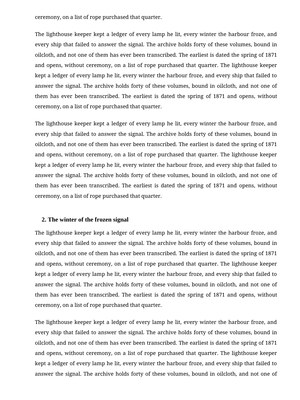 PDF — A4 page, thumbnail type
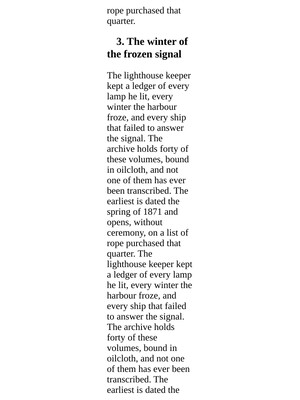 ePub — reflowed, one thumb
Upload, wait a moment, download. This is the whole app.
Unlock PDF TO EPUB PHONE CYBORG to run it. A €1 day pass is the quickest way in, about 30 seconds.
Unlimited use of every AppsCyborg tool for 24 hours, not just this one task. One click, no commitment.
Sign up to get the day passQuick signup, then one tap with Apple Pay or Google Pay.
Yearly (€6) and lifetime (€30) plans also available (+ VAT). Sign up to see all options →
€1 day pass · €6 yearly · €30 lifetime · no ads, ever
Already have an account? Sign in
No cable and no sideloading — a phone will open an ePub from wherever the file already is. Three routes, all about ten seconds.
This page works in a phone browser too. Download the ePub and tap it — your reading app offers to open it straight away.
Save to Drive, iCloud or Dropbox on the computer, then open it from the same folder on the phone.
AirDrop, a chat message or an email to your own address. Tap the attachment, choose your reader.
Know the trade before you make it. A PDF is a fixed page; an ePub is a river of text. You give up exact layout to gain readability — a fine deal for a report, a paper or a novel, a bad one for a magazine, a two-column journal article or anything where the design carries meaning. A scanned PDF still converts, but differently: there is no text in it to reflow and nothing here does OCR, so its pages are refitted to a phone-sized page and come back as images. Readable, but not searchable or resizable. Reading on a Kindle or Kobo rather than a phone? PDF to ePub eReader Cyborg fits those same scanned pages to e-ink instead. Up to 50 files at 200 MB each, and your download link stays live for 60 minutes.
It opens them and renders the whole page, which on a phone means eight-point type. So you zoom in, and now you're dragging sideways to finish every line.
Lines end where the screen ends, so reading is scrolling or tapping — never panning.
Reflowed text takes your app's night theme. A PDF page stays a white rectangle at 1am.
No cloud reading account involved — useful when the PDF is an internal document. Files go after 60 minutes.
A 24-hour day pass costs €1. No subscription, no auto-renewal — decide later.
| PDF to ePub Phone | Phone PDF viewer | Read-later app | Calibre on a computer | |
|---|---|---|---|---|
| Text reflows to the screen | Yes | No — zoom and pan | Usually | Yes |
| Dark mode & font control | Your reader's own | Inverted colours at best | Yes | Yes |
| Works from the phone itself | Yes | Yes | Yes | No — needs a desktop |
| Document uploaded to a service | Deleted after 60 min | Never leaves the phone | Stored in your account | Stays local |
| Reads offline afterwards | Yes — it's a file | Yes | If you sync first | Yes |
| Keeps exact page layout | No — that's the trade | Perfectly | No | No |
| Handles scanned pages | As fitted page images, no OCR | Yes, as images | No | Only with OCR set up |
| Price | from €1 | Free | Free or subscription | Free |
Honest guidance: for a two-page letter, just open the PDF — converting it is more work than reading it. If you have a computer to hand and convert often, Calibre is free and does more. Come here for the long document you want to get through on the commute, from the phone itself, without adding it to a read-later service that keeps a copy. The trade is exact layout for readability, and it's covered by the same €1 that unlocks the other 78 tools.
A short walkthrough: a PDF in, a phone-friendly ePub out.
Ready to try it? Create your account above.
A phone gets the ten-minute gaps in the day. Long documents only get read if they survive those gaps.
Forty minutes standing up, one hand on a rail. The only reading position a PDF genuinely cannot survive.
A hundred pages to have read before the meeting, and no laptop time left to do it in.
Set texts handed out as PDFs, read in the gaps between lectures rather than at a desk.
Night mode and a warm screen instead of a white A4 page glowing at you in bed.
Reflowed text can be enlarged or read aloud properly. A fixed page fights both.
It's a file on the phone, so it reads on a plane without a connection or an app logging in.
Whatever it's for, upload the PDF and download the ePub.
Reading on a Kindle or Kobo? PDF to ePub eReader Cyborg. Phone app that wants MOBI? PDF to Mobi Phone Cyborg. Need to edit the text rather than read it? PDF to Word Cyborg — all included in one account.
Upload your PDF — reflowable text, no watermark, nothing kept.
Unlock PDF TO EPUB PHONE CYBORG to run it. A €1 day pass is the quickest way in, about 30 seconds.
Unlimited use of every AppsCyborg tool for 24 hours, not just this one task. One click, no commitment.
Sign up to get the day passQuick signup, then one tap with Apple Pay or Google Pay.
Yearly (€6) and lifetime (€30) plans also available (+ VAT). Sign up to see all options →
Already have an account? Sign in