AppsCyborg
UP TO 50 PHOTOS · NO WATERMARK · PRINT-READY
Puzzle Cyborg icon

Your photo, as a jigsaw puzzle

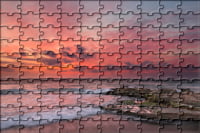
Drop a picture in, choose how many pieces, and get the puzzle back as an image — interlocking pieces cut across your own photo. Print it on card, cut along the lines, and it's a real puzzle.

Nothing stamped in the corner — a puzzle you can actually give away

Turn a photo into a jigsaw puzzle Up to 50 photos
Drop a photo here or browse
A photograph before the puzzle cut is drawn across it BEFORE The same photograph with interlocking jigsaw pieces cut across it PUZZLE
family-beach-puzzle.jpg · no watermark Ready

Drop a photo, download the puzzle. This is the whole app.

4.8 / 5 · Trusted by 10,000+ paid members · 4.8 / 5
PUZZLE CYBORG is locked
Sign in or grab a day pass to start.
Locked

You're one step from your file.

Unlock PUZZLE CYBORG to run it. A €1 day pass is the quickest way in, about 30 seconds.

Day pass €1 for 24h
+ VAT, one-time

Unlimited use of every AppsCyborg tool for 24 hours, not just this one task. One click, no commitment.

Sign up to get the day pass

Quick signup, then one tap with Apple Pay or Google Pay.

No subscription 7-day refund 10,000+ paid

Yearly (€6) and lifetime (€30) plans also available (+ VAT). Sign up to see all options →

€1 day pass · €6 yearly · €30 lifetime · no ads, ever

Already have an account? Sign in

One account unlocks all 79 AppsCyborg tools Convert, compress, merge, download — image, PDF, video and more. See all tools →

Two steps. That's it.

1

Drop the photo in

JPG · PNG · WEBP · up to 50 files
Choose 24, 100 or 300 pieces and that's the only setting. Busy photos with lots of colour make the best puzzles — a big patch of plain sky is punishing to solve.
2

Download the puzzle

family-beach-puzzle.jpg Full size · no watermark
An ordinary image file — print it, send it to a photo lab, or post it as a picture to be puzzled over.

Making a real one Print on the heaviest card your printer takes, or glue an ordinary print onto thin card and let it dry flat before cutting. The lines are there to cut along; a craft knife and a steady hand beat scissors. Want several photos in one puzzle first? Montage CyborgNeed the file smaller to send? Compress Image Cyborg— both in the same account. Your download link stays live for 60 minutes.

Why not order a custom puzzle?

Because a printed one in a box takes a fortnight and costs thirty euros. This is for the afternoon you have now, with card and a craft knife.

Full size, clean

Big enough to print properly, with nothing written across the corner.

No account to cancel

A €1 day pass is a one-off payment. Nothing renews, nothing bills you next month.

Nothing kept

No gallery, no feed, no camera-roll permission. Files go when the 60-minute link expires.

Pieces that look like pieces

The rows and columns are worked out from your photo's shape, so the pieces stay roughly square — a wide panorama doesn't come back cut into slabs.

Puzzle Cyborg vs. the alternatives

Puzzle Cyborg Free puzzle sites A printed custom puzzle
Watermark NoneUsuallyNone
You get the image file Yes, full sizePlays on their siteA physical box
Time to have it Under a minuteA minuteDays to weeks
Piece count 24, 100 or 300Usually fixedWhatever you order
Photos kept on their servers NoneNoneNo
Photos published or shared NeverOften public by defaultNo
Price From €1Free, with ads€25–50

A printed custom puzzle in a box is a proper present and worth the money when there's an occasion and a fortnight to spare. The free puzzle sites keep your picture on their servers, wrap the thing in advertising and only let it be solved on screen — you never get a file. This gives you the image, full size and clean, and what you do with it is your business. Paid for by the €1 that got you in.

See it in action

A short walkthrough: drop a photo, choose the piece count, print and cut.

Ready to try it?

What people make with it

A puzzle made of a photo people recognise is worth ten off the shelf.

1:1
same size out as in
50
photos per run
60
minutes to download
€1
for a whole day of it

One photo, one afternoon

Print a photo of the dog at twenty-four pieces and the afternoon is solved, for the cost of some card.
Announcements

Post the puzzle instead of the photo — the scan, the ring, the new address — and let people work it out.

Party games

Cut one up, hide the pieces, and you have a treasure hunt that ends in a picture of the birthday child.

Presents

A puzzle of somewhere you both went, printed and cut at three hundred pieces, costs an afternoon and lands better than most things that cost more.

Classrooms

Twenty-four pieces of a map, a painting or a diagram, and the class has to put the subject back together before they can read it.

Keeping children busy

Their own drawing, scanned and cut into two dozen pieces, occupies far longer than the drawing did.

Whatever it's for, drop the photo and download the puzzle.

Need something slightly different?

Want several photos in one picture first? Montage CyborgWant it drawn before you cut it up? Cartoon CyborgNeed the file smaller to send? Compress Image Cyborg— all included in one account.

Browse all 79 tools

Common questions

Getting started

What does Puzzle Cyborg do?
It draws an interlocking jigsaw cut across your photograph. Drop a picture in, choose 24, 100 or 300 pieces, and download the result at full size with no watermark. Print it on card and cut along the lines and you have a real puzzle.
What exactly do I get?
An image file of your photo with the puzzle cut drawn across it — one flat picture, not separate pieces. It's yours to keep: print it and cut along the lines for a real jigsaw, or just post the picture and let people squint at it.
Which formats can I upload?
JPG, PNG and WEBP. A JPG or WEBP comes back as a JPG at the quality your upload already had; a PNG, GIF, BMP or TIFF comes back as a PNG, so nothing lossless is quietly re-compressed. Anything else — HEIC from an iPhone, RAW from a camera — goes through Image to JPG Cyborg first, which is in the same account.
Does it work on a phone?
Yes — pick the photo from your camera roll on Android or on iOS 12 and higher. Nothing to install, and no permission to your whole library.

The puzzle & printing it

How many pieces should I choose?
Twenty-four for a small child, a hundred for a family evening, three hundred for someone who does puzzles properly. Remember you have to cut every one of them out by hand — three hundred is a long evening with a craft knife before anybody gets to solve it.
Which photos make good puzzles?
Busy ones. Lots of different colours and areas give the solver something to work with; a photo that's half plain sky or a single flat colour is punishing rather than fun. If one picture isn't busy enough, combine several into one with Montage Cyborgfirst — a collage is easier to solve and looks better cut up. Or draw it first with Cartoon Cyborgfor something a child can manage.
What should I print it on?
The heaviest card your printer takes, or an ordinary photo print glued to thin card — spread the glue thinly, press it under a book, and let it dry completely flat before you cut. Damp glue warps the pieces and they never sit right afterwards.
Do I get exactly that many pieces?
Close to it, not exactly. Rows and columns are whole numbers, so a hundred might come back as 108 or 96 depending on the shape of your photo — the alternative would be stretching the pieces to force the total, which is what makes a puzzle look wrong. The tab shapes are also randomised slightly, so running the same photo twice gives two subtly different cuts.
Can I print it big?
You get the same pixel size you sent, so send the biggest original you have — straight off the camera or phone, not a copy that's been through a chat app. Bigger pieces are easier to cut out accurately, which matters more than you'd think.
Can I make one from several photos?
Combine them into one picture with Montage Cyborg first, then drop the collage in here. A collage puzzle is also easier to solve than a single photograph, because the joins between pictures give the solver somewhere to start.
Can I do a whole set at once?
Yes — up to 50 photographs in one go, and they come back together as a ZIP. They all get the piece count you chose, so a set of puzzles for a party comes out matching.
When does the download link expire?
After 60 minutes. Save the image as soon as it's ready — after that the link expires and you'd upload the photo again.

Pricing, privacy & rights

How much does it cost?
A €1 day pass gives you 24 hours of unlimited puzzles. Yearly is €6 and lifetime is €30. All three are one-off payments — nothing renews and nothing bills you next month — and every plan unlocks all 79 AppsCyborg tools.
What happens to my photo?
It's used to make your puzzle and then deleted along with it when the 60-minute link expires. Nothing is kept, published, shown in a public gallery or used to train anything — no ads, no trackers.
Can I sell the result?
If the photo is yours, the puzzle is yours — print it, gift it, sell it, no attribution needed. If someone else took the photo, cutting it into pieces doesn't transfer their rights, and a recognisable person still has a say in commercial use.
Still have a question?
We usually reply within a day.
Contact support

A puzzle of it, in under a minute.

Drop your photo in, pick a piece count, and download the puzzle — full size, no watermark, nothing kept.

24, 100 or 300 pieces From €1, no subscription Files deleted after 60 min
PUZZLE CYBORG is locked
Sign in or grab a day pass to start.
Locked

You're one step from your file.

Unlock PUZZLE CYBORG to run it. A €1 day pass is the quickest way in, about 30 seconds.

Day pass €1 for 24h
+ VAT, one-time

Unlimited use of every AppsCyborg tool for 24 hours, not just this one task. One click, no commitment.

Sign up to get the day pass

Quick signup, then one tap with Apple Pay or Google Pay.

No subscription 7-day refund 10,000+ paid

Yearly (€6) and lifetime (€30) plans also available (+ VAT). Sign up to see all options →

Already have an account? Sign in