AppsCyborg
MIRRORED LEFT–RIGHT · SOUND UNTOUCHED · NO WATERMARK
Flip Horizontal Video Cyborg icon

Un-mirror the selfie footage.

Front-camera video comes out flipped: the writing on your shirt reads backwards, you raise your right hand and the screen shows the left. Upload it here and it comes back the right way round, sound untouched.

No watermark burned into the corner — a video you can actually publish

Flip a video left to right mirror
Drop a video here or browse
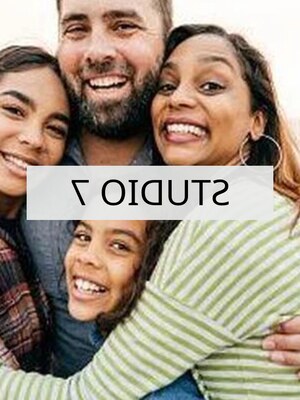
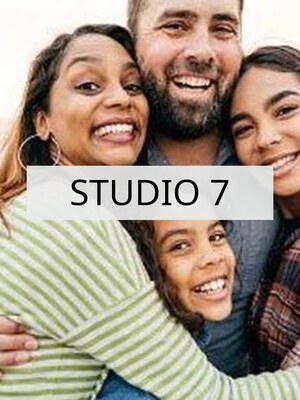
A frame of selfie footage in which the sign in shot reads backwards as recorded — text backwards The same frame mirrored, with the sign now reading properly flipped — reads properly
to-camera-take3-flipped.mp4 · no watermark Ready

Upload, wait a moment, download. This is the whole app.

4.8 / 5 · Trusted by 10,000+ paid members · 4.8 / 5
FLIP HORIZONTAL VIDEO CYBORG is locked
Sign in or grab a day pass to start.
Locked

You're one step from your file.

Unlock FLIP HORIZONTAL VIDEO CYBORG to run it. A €1 day pass is the quickest way in, about 30 seconds.

Day pass €1 for 24h
+ VAT, one-time

Unlimited use of every AppsCyborg tool for 24 hours, not just this one task. One click, no commitment.

Sign up to get the day pass

Quick signup, then one tap with Apple Pay or Google Pay.

No subscription 7-day refund 10,000+ paid

Yearly (€6) and lifetime (€30) plans also available (+ VAT). Sign up to see all options →

€1 day pass · €6 yearly · €30 lifetime · no ads, ever

Already have an account? Sign in

One account unlocks all 79 AppsCyborg tools Convert, compress, merge, download — video, audio, image and more. See all tools →

Two steps. That's it.

1

Upload the video

MP4, MOV, AVI, MKV, WebM & more · up to 50 files
Nothing to set. There's one operation here and it doesn't need options.
2

Download the mirror

to-camera-take3-flipped.mp4 Same length · audio in sync
Same resolution, same frame rate, same duration — and the sound is copied across, not re-encoded.

Flipping is not rotating. This mirrors left and right — it won't stand up footage that was filmed sideways, which is a rotation and a different job. And a mirror cuts both ways: if there is a sign, a logo or a subtitle in the shot, flipping the picture makes that text run backwards. Flip it to fix a mirrored selfie, not to fix a video that already reads correctly. If it is upside down you want, Flip Vertical Video Cyborg does that instead, and if a player struggles with the result, Video to MP4 Cyborg gives you the most widely playable file — both in the same account. The picture is re-encoded once, so expect a single generation of compression. Your download link stays live for 60 minutes.

Any editor can flip a clip. Why this?

They can, and if a video editor is already open on your machine, flip it there. This is for when installing one to change a single clip is the silly option.

One job, no timeline

No project to create, no export settings to pick, no render queue to sit through.

Sound left alone

The audio track is stream-copied, not re-encoded — the same bytes come out the other side, still in sync.

Your footage stays yours

Nothing kept, published or used to train anything. Files go when the 60-minute link expires.

Try it for €1

A 24-hour day pass costs €1. No subscription, no auto-renewal — decide later.

Flip Horizontal Video Cyborg vs. the alternatives

Flip Horizontal Cyborg Desktop video editor Phone editing app ffmpeg on the command line
Setup before the first flip None Install, project, export Install an app Install & learn the flag
Works on a locked-down machine Yes Needs install rights Phone only Needs install rights
Watermark on the export Never Depends on the tier Free tiers often do Never
Keeps resolution & audio sync Yes Yes Often downscales Yes
Trim, caption, colour, edit No — flip only All of it Most of it If you know how
Big files & long clips Upload time applies Local, fast Local Local, fast
Price From €1 Free to a subscription Free, with limits Free

If you edit video for a living, your editor does this in two clicks and you should use it. This is the other case: one clip that came out mirrored, on a machine where you can't install anything, or a phone app that would hand it back watermarked and downscaled. It does one thing and doesn't ask you to learn a timeline first. Large files spend their time uploading, which is the honest cost of doing it in a browser — and it's covered by the same €1 that got you in.

See it in action

A short walkthrough: a mirrored clip in, the right way round out.

Ready to try it?

Why people flip a clip

Nearly always because a camera mirrored it, or because the mirror is the point.

1
operation, no options
0
watermarks & ads
60
minutes to download
€1
for a whole day of it

Selfie & webcam footage

Front cameras mirror what they record. Anything written in shot comes out backwards until you flip it.

Tutorials & instruction

Mirror a demonstration so viewers can follow along with the same hand as the person on screen.

Dance & sport coaching

Flip a routine so it matches the direction a class learned it in, or compare a stance side by side.

Matching a cut

Two shots where the subject walks opposite ways. Flip one and the eye stops noticing the join.

Vehicle & dashcam clips

A rear-view or reversing camera that shows the world the wrong way round for the report.

Layout & composition

Move the subject to the other side of frame so a caption or logo has room to sit.

Whatever it's for, upload the clip and download the mirrored version.

Need something slightly different?

Need it upside down instead? Flip Vertical Video Cyborg · Wrong format for the upload? Video to MP4 Cyborg · File too big to send? Compress Video Cyborg — all included in one account.

Browse all 79 tools

Common questions

What flipping does

Is flipping the same as rotating?
No, and this is the mix-up worth avoiding. Flipping mirrors the picture left to right, like looking at it in a mirror. Rotating turns it 90 or 180 degrees. If your problem is footage filmed sideways, flipping won't fix it.
Why is my selfie video mirrored at all?
Because front cameras show you a mirror while you film, so moving feels natural — and some phones save it that way too. It only becomes obvious when there's text in shot, or when you notice you're waving with the wrong hand.
What happens to text in the shot?
It mirrors with everything else. That's the fix when the text is already backwards, and the problem when it isn't — a logo, shop sign or burned-in subtitle that read correctly will read backwards afterwards.
Does the audio change?
No, and not merely "it still plays": the audio track is copied across byte for byte rather than re-encoded, so it is the same sound in the same sync. Stereo channels are not swapped either — mirroring the picture doesn't move the sound stage.
Will the quality drop?
Changing the picture means the video is encoded again, so there's one generation of compression — the same as any editor's export. Resolution, frame rate and length stay as they were, and you won't see the difference in normal viewing.

Files & getting started

How long does it take?
Mostly it depends on your upload speed and the length of the clip — the flip itself is quick, a ten-second phone video takes about a second and a half on our side. WebM is the slow one: it has to be re-encoded with VP9, which takes roughly ten times as long as the same clip as MP4.
What if I need it the other way up, or in another format?
Different jobs, both in the same account. Flip Vertical Video Cyborg turns a clip upside down rather than mirroring it, and Video to MP4 Cyborg gives you the most widely playable file if a player struggles with what you have.
Which formats can I upload?
MP4, MOV, M4V, MKV, AVI, WMV, WebM, FLV, MPG, MPEG, 3GP and GIF. You get the same format back: the file is written into the container it arrived in, using that container's own codec, so an AVI stays an AVI rather than quietly becoming something else.
Is my original changed?
No — you get a new file and the original stays where it is. Flipping the result again returns it to how it started, so nothing here is one-way.
Can I do several clips at once?
Yes — up to 50 in one go, and they come back together as a ZIP. They are processed one after another, so a batch of long clips takes as long as the sum of its parts.
When does the download link expire?
After 60 minutes. Save the video as soon as it's ready — after that the link expires and you'd upload again.

Pricing, privacy & rights

What happens to my video?
It's used to make the flipped copy and then deleted along with it when the 60-minute link expires. Nothing is kept, watched, indexed or used to train anything, and requests are anonymous — no ads, no trackers.
Can I flip a video someone else made?
Technically yes, and getting that right is on you. A mirrored clip is a modified clip: it reverses which hand someone used, which way a vehicle was travelling and what any sign in the shot says. Use it on footage you have the right to use, and don't present the result as the original.
Can I publish or sell the result?
Yes — it's your footage, and there's no watermark or attribution required. Post it, licence it, put it in a paid course.
How much does it cost?
A €1 day pass gives you 24 hours of unlimited videos. Yearly is €6 and lifetime is €30. All three are one-off payments — nothing renews and nothing bills you next month — and every plan unlocks all 79 AppsCyborg tools.
Still have a question?
We usually reply within a day.
Contact support

The right way round, in one upload.

Upload your clip — same resolution, sound untouched, nothing kept.

Up to 50 clips From €1, no subscription Files deleted after 60 min
FLIP HORIZONTAL VIDEO CYBORG is locked
Sign in or grab a day pass to start.
Locked

You're one step from your file.

Unlock FLIP HORIZONTAL VIDEO CYBORG to run it. A €1 day pass is the quickest way in, about 30 seconds.

Day pass €1 for 24h
+ VAT, one-time

Unlimited use of every AppsCyborg tool for 24 hours, not just this one task. One click, no commitment.

Sign up to get the day pass

Quick signup, then one tap with Apple Pay or Google Pay.

No subscription 7-day refund 10,000+ paid

Yearly (€6) and lifetime (€30) plans also available (+ VAT). Sign up to see all options →

Already have an account? Sign in